Afficher les exigences

  1. Accédez à l’outil Facturation au niveau projet.

  2. Cliquez sur l’onglet Sous-traitant

  3. Localisez la facture et cliquez sur le lien # de facture pour l’ouvrir.

     Pointe

    Saviez-vous que vous pouvez également ouvrir des factures à partir de l’outil Engagements ? Accédez à l’outil Engagements, cliquez sur l’engagement à ouvrir, puis cliquez sur l’onglet Factures. Cliquez sur le lien # de facture, puis suivez les étapes ci-dessous.

  4. Dans la facture, cliquez sur l’onglet Conditions de paiement.

Conditions de paiement disponibles

L’onglet Conditions de paiement affiche les informations suivantes :
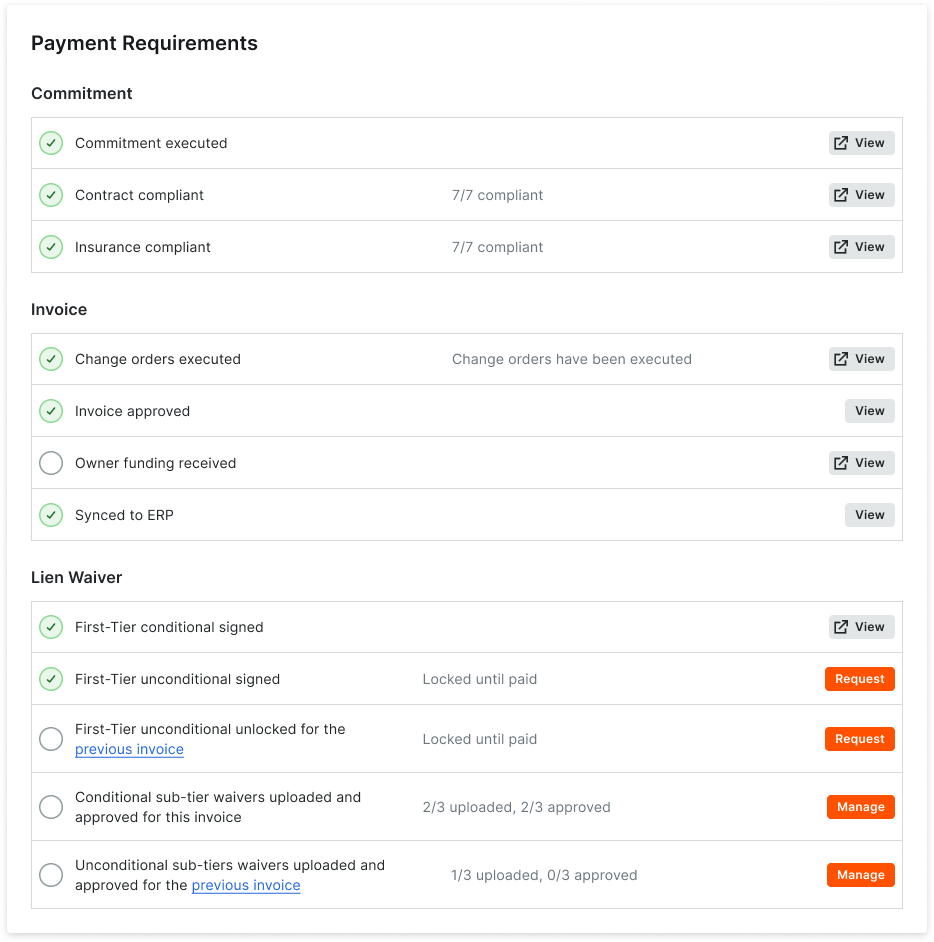
Payment Requirements Invoice Administrator

Conditions de paiement

Ce tableau détaille les conditions de paiement.

 Remarque

Si vous êtes un administrateur des factures, ces boutons sont visibles dans cet onglet :

  • Vue. Ouvre la facture de sous-traitant afin que vous puissiez afficher ou modifier l’élément correspondant.

  • Demande. Permet d’envoyer une demande par e-mail à un contact de facturation pour lui demander de débloquer une renonciation de privilège inconditionnelle signée.

  • Gérer. Ouvre l’onglet Droits de privilège de la facture de sous-traitant.

Category

Requirement

When the requirement is ON...

When the requirement is OFF...

Learn More

Commitment

Commitment Executed

Tracks the commitment associated with the invoice to ensure a check mark appears in the 'Executed' box.

Doesn't track the 'Executed' state on the commitment.

Create a Commitment Edit a Commitment

Contract Compliant

Tracks the status of the contract compliance documents for the commitment.

Doesn't track the compliance status of the insurance certificates

Manage Contract Compliance Documents & Statuses for a Commitment

Insurance Compliant

Tracks the status of the insurance certifications for the commitment.

Doesn't track the compliance status of the insurance certificates.

Manage Insurance & Compliance Statuses for a Commitment

Holds Released

Tracks the status of any payment holds applied to invoices. Holds must be released before payment.

Doesn't track invoices for payment holds.

Manage Payment Holds as a Payor

Invoice

Change Orders Executed

Tracks change orders that impact the contract associated with the invoice and require them to be in the 'Executed' state.

Doesn't track change orders.

Create a Change Order

Invoice Approved

Tracks invoices to ensure they are in one of these statuses: Approved, Approved as Noted, and Pending Owner Approval. See What are the default statuses for Procore invoices?

Doesn't track invoice status.

Bulk Edit the Status of Subcontractor Invoices with the Invoicing Tool

Owner Funding Received

Ensures the owner invoice is shown as fully paid on the 'Payment Received' tab.

Doesn't track 'Payment Received' entries on owner invoices or compare values on the subcontractor invoice.

Create a Record for a Payment Received

Sync to ERP

Tracks the invoice to ensure it is synced with an integrated ERP system.

Doesn't track invoice syncing with ERP

ERP Integrations

Lien Waiver

First-Tier Conditional Lien Waiver Signed

Tracks first-tier signatures on conditional lien waivers on your invoices. Note: Only appears on an invoice when the requirement is enabled on its project. See Enable Lien Waiver Templates on a Project.

Doesn't track signatures

Create Lien Waiver Templates

First-Tier Unconditional Lien Waiver Signed

Tracks first-tier signatures on unconditional lien waivers for your invoices. Note: Only appears on an invoice when the requirement is enabled on its project. See Enable Lien Waiver Templates on a Project.

Doesn't track signatures

Create Lien Waiver Templates

First-Tier Unconditional Unlocked for the Previous Invoice

Tracks first-tier signatures on unlocked unconditional lien waivers for the commitment's previous invoices. Notes: Only appears on an invoice when the requirement is enabled on its project. See Enable Lien Waiver Templates on a Project.

Doesn't track signatures

An invoice administrator can Send a Request to Unlock a Signed Unconditional Lien Waiver. An unconditional lien waiver can only be unlocked by an invoice contact. See Unlock a Signed Unconditional Lien Waiver as an Invoice Contact.

Conditional Sub-Tier Waivers Uploaded and Approved for this Invoice

Tracks when sub-tier waivers are in the 'Approved' status. This requirement will not exist on projects that has disabled sub-tier waivers. Note: If sub-tier waivers are disabled on a project, this requirement won't appear. See Enable the Sub-Tiers Card & Add Instructions on Project Invoices.

Doesn't track signatures

Manage Sub-Tier Waivers

Unconditional Sub-Tier Waivers Uploaded and Approved for this Invoice

Tracks when sub-tier waivers are in the 'Approved' status. This requirement will not exist on projects that has disabled sub-tier waivers. Note: If sub-tier waivers are disabled on a project, this requirement won't appear. See Enable the Sub-Tiers Card & Add Instructions on Project Invoices.

Doesn't track signatures

Manage Sub-Tier Waivers