Update Saved Views in Capital Planning
Background
Update saved views in Capital Planning to modify column configurations, display ordering, or filtering criteria as reporting requirements shift. Modifying existing views ensures you maintain consistent portfolio layouts without recreating custom table settings repeatedly.
Things to Consider
Required User Permissions:
'Admin' level permissions to update 'Company Views'.
'Standard' level permissions or higher to update 'Personal Views'.
Additional Information:
Updating a company-level view modifies the layout for all users who access that view.
Updating a personal view affects only your user account.
Steps
Navigate to the company's Capital Planning tool.
Click the
 Views button.
Select the Saved View you want to update.
Adjust the table layout settings as needed.
Click Update.
Edit Name and/or Description
Navigate to the company's Capital Planning tool.
Click the
Views button.Select the Saved View you want to update.
Click the vertical ellipsis
 icon next to the relevant saved view.
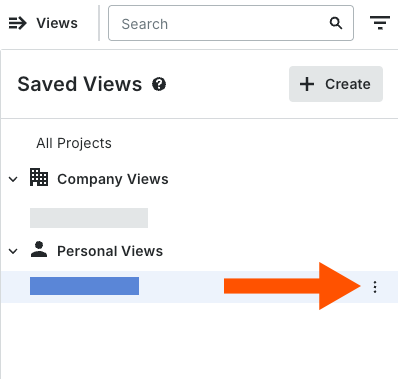
Select Edit.
Update the Name and/or Description.
Click Update.

See Also
Loading related articles...