Create a Coordination Issue

The Coordination Issues tool centralizes issue tracking and helps to automate data entry so your team can stay focused on problem-solving. Identifying and recording model issues early is critical for saving time and budget. By resolving these conflicts upfront, you significantly reduce the volume of RFIs and Change Events required later in the project.

Things to Consider

Tip

Did you know you can create and edit coordination issues from a variety of different Procore tools and products? To learn more, see What are the different tools I can use to create a coordination issue?
Steps

  1. Navigate to the Coordination Issues tool.

  2. Click the +Create button at top of the page to open the New Issue panel.
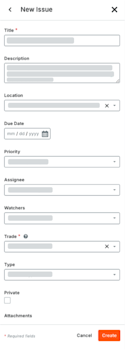
    This image shows the New Issue panel after a user clicks the Create button at the top of the Project level Coordination Issues tool.

  3. Complete the required fields in the New Issue panel.

    Show/Hide Fields

    This table summarizes all of the data entry fields for a coordination issue.

    Field Name

    Description

    Required?

    Notes

    Title

    Enter a concise, descriptive name for the issue to help collaborators identify it.

    Yes

    Private

    Select this checkbox to limit issue visibility to the Creator, Assignee, and Watchers.

    No

    Description

    Provide a detailed summary of the issue. This text is also saved as a viewpoint comment in the final NWD file.

    No

    When creating an issue from Clash Manager, you can also select Append Clash Comments or Append Redline Text.

    Location

    Choose the primary location for the issue.

    No

    Assignee

    Select the person responsible for resolving the issue. Only users with 'Standard' or 'Admin' level permissions for the Coordination Issues tool appear in this list.

    No

    Watchers

    Select team members to receive email updates. Watchers must have at least Read Only permissions.

    No

    Due Date

    Set the target deadline for issue resolution.

    No

    Priority

    Define the level of urgency: Low, Medium, High, or Critical.

    No

    Trade

    Identify the discipline involved (e.g., Mechanical, Electrical).

    No

    Type

    Categorize the issue for reporting. Options include: Building Code, Clash, Client Feedback, Constructability, Coordination, Design Review, Existing Condition, Requirement Change or Other.

    No

    Attachments

    Upload up to 20 relevant images, PDFs, or documents to provide additional context.

    No

    Custom Fields

    If your company creates custom fields for the Coordination Issues tool, they also appear in this page.

    Determined by the creator at your company.

  4. Click Create to create a new issue.

Procore adds a new issue in the Open status to the table on the Coordination Issues dashboard.

See Also

Loading related articles...