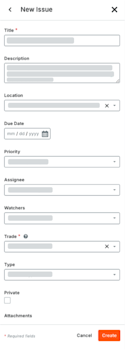
Create a Coordination Issue
The Coordination Issues tool centralizes issue tracking and helps to automate data entry so your team can stay focused on problem-solving. Identifying and recording model issues early is critical for saving time and budget. By resolving these conflicts upfront, you significantly reduce the volume of RFIs and Change Events required later in the project.
Things to Consider
Additional Information:
Clicking 'New Issue' saves your current 3D view and markups as a snapshot.
Your New Issue panel may contain custom fields or fieldsets not documented in this tutorial. See What are configurable fieldsets and which Procore tools support them?
Did you know you can create, edit, and view coordination issues from a variety of different Procore tools and products? To learn more, see What are the different tools I can use to create a coordination issue?