Quelles intégrations sont disponibles pour la Planification des ressources ?

Arrière-plan

Lorsque vous configurez la Planification des ressources, vous pouvez choisir d’intégrer votre système d’enregistrement afin de pouvoir gérer les personnes et les projets dans votre système d’enregistrement, et synchroniser ces données avec la Planification des ressources. Travaillez avec l’équipe de votre compte Procore pour identifier votre ou vos systèmes d’enregistrement et l’option d’intégration qui convient le mieux à votre entreprise.

 Remarque

Toutes les informations de votre système d’enregistrement ne peuvent pas être intégrées à la Planification des ressources. Les rôles et les affectations du projet, par exemple, ne s’intègrent pas. Pour afficher la liste des champs qui s’intègrent, voir Planification des ressources Mappage détaillé des données.

Une fois que vous avez choisi comment intégrer votre système d’enregistrement, vous pouvez décider comment vous souhaitez synchroniser vos données entre Planification des ressources et d’autres outils Procore.
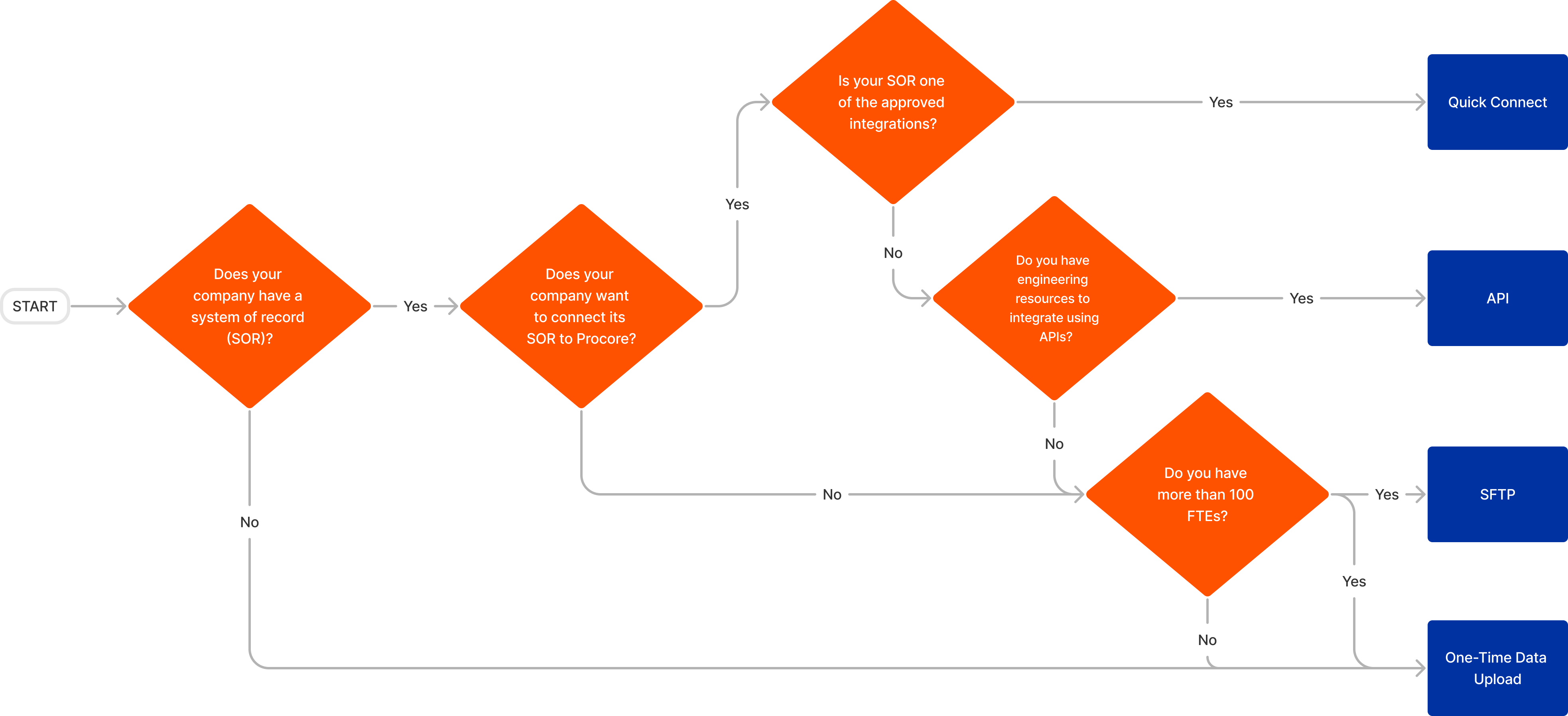
Answer

There are three integration options available:

If none of the options work for your company, Procore can do a one-time data upload to add your people and projects.

Clipboard E12aa7737f699558a57d0e4b569a4c767

Quick Connect

The QuickConnect integration syncs data from your system(s) of record to Resource Planning. This option is available to customers with an approved compatible system and takes approximately two weeks to implement.

QuickConnect syncs can run multiple times a day at desired times and sync one-way from your system of record to Resource Planning. There can be a separate source for people, and another source for projects; or both can come from the same source.

 Remarque

Si vous intégrez déjà votre ERP à Procore, il est recommandé de transférer les projets de l’outil Portefeuille de Procore vers Planification des ressources.

To see what fields sync between your system of record and Resource Planning, see Resource Planning Detailed Data Mapping.

API

An API integration allows you to build your own APIs to connect your data to Resource Planning. This option gives you the most flexibility and customization for how data is integrated into Resource Planning. This option requires engineering resources from your company to build the integration, and as such, takes additional time to implement. We recommend this path only if you are familiar with using APIs to connect systems.

If you do not have experience working with APIs, but would still like to explore this option, the Technical Services Team can scope a Procore built connection.

To learn more about authentication and see a full list of available Resource Planning API endpoints, see Resource Planning API Documentation.

To learn more about testing, see What is the Monthly Sandbox Environment?

SFTP

SFTP is a secure, encrypted, way to transfer files over the internet. This integration option allows customers to use standardized CSV templates to upload the file(s) to a Procore hosted server when they want to update people and project data. This overwrites existing data and transfers it through the SQL database into Resource Planning automatically.

One-Time Data Upload

If an integration is not an option for your company, Procore offers a data import to add your people and projects to Resource Planning. After the import, Resource Planning becomes the source of truth for People and Projects are manually updated in Resource Planning.

To get started with your data upload, see Prepare Data for Import to Resource Planning.

Voir aussi

Chargement des articles connexes...